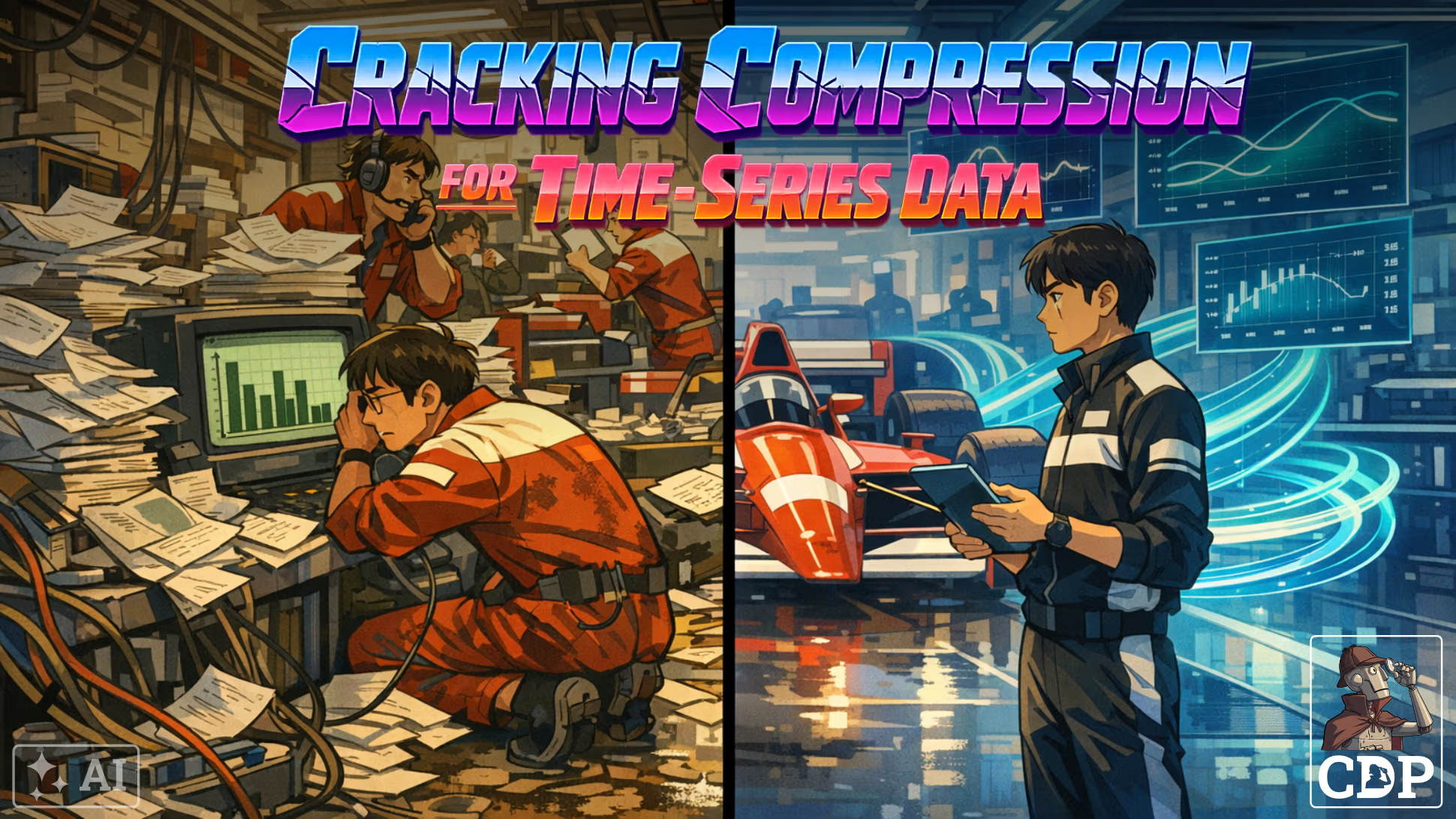
This post outlines some of the benefits in using a time series database such as TimescaleDB for storage and running analytical queries. A comparison with flat files (such as parquet) and modern query engines (such as duckdb) is used to illustrate the potential advantages of databases for these uses cases. The analysis is not intended to be a benchmark.
The following charts provide a snapshot of the results.
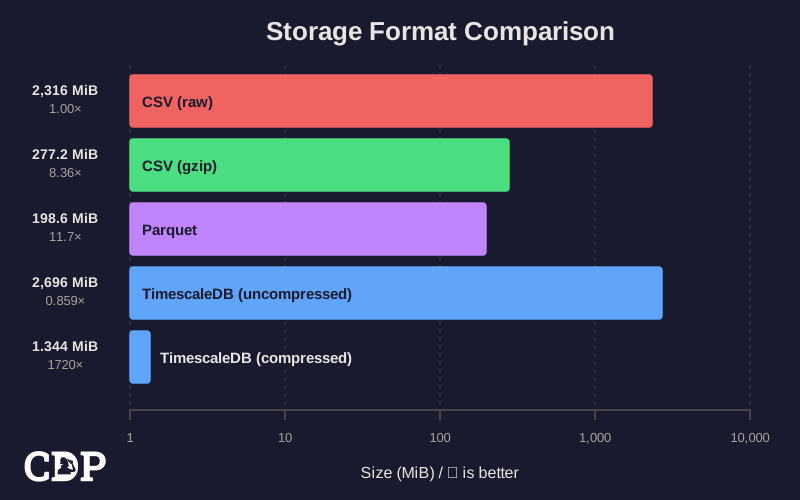
The chart illustrates that storing data within a PostgesSQL database is similar to uncompressed text files. However, time series data given it’s context can be compressed using non-dictionary based algorithms leading, in the case of TimescaleDB, to a reduction in storage consumed by three orders of magnitude to under 1.5 MiB from 2.7 GiB.
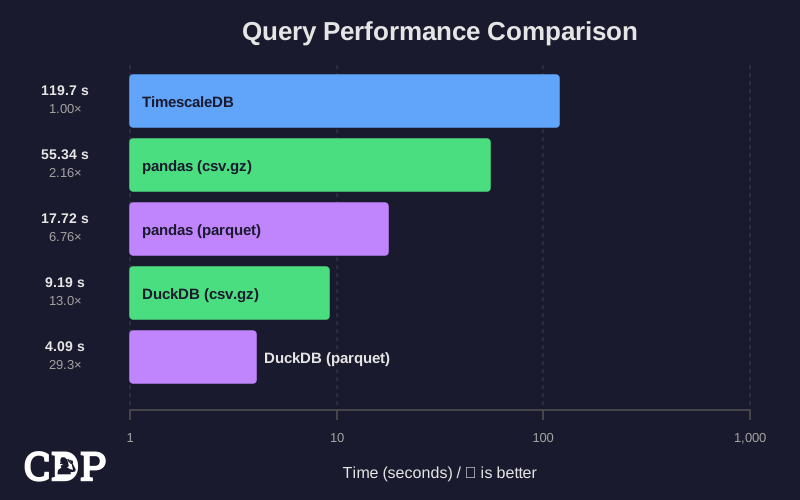
For general queries (that are not optimised to take advantage of time series functions i.e. hyperfunctions) it can take 30x longer than a modern query engine such as duckb. There are of course means to embed duckdb into PostgesSQL itself, although this is not the focus of this post.
This is the evidence cited for the use of flat files for general and many Machine Learning (ML) queries in the parquet format as opposed to using a database.
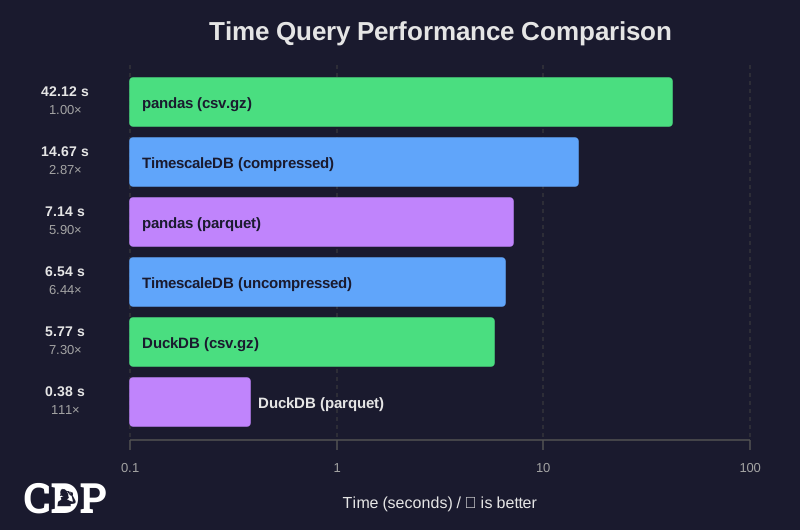
If however, the query can be characterised using the built-in time based functions (called hyperfunctions by TimescaleDB) such as time_bucket, then the performance is similar and competitive with more modern query engines. The two queries are similar, in that the first calculated a rolling average over a 30 second period, whereas this query uses a fixed time bucket of 30 seconds. The clear winner however is duckdb which has a time_bucket function similar to TimescaleDB itself (and potentially inspired by it).
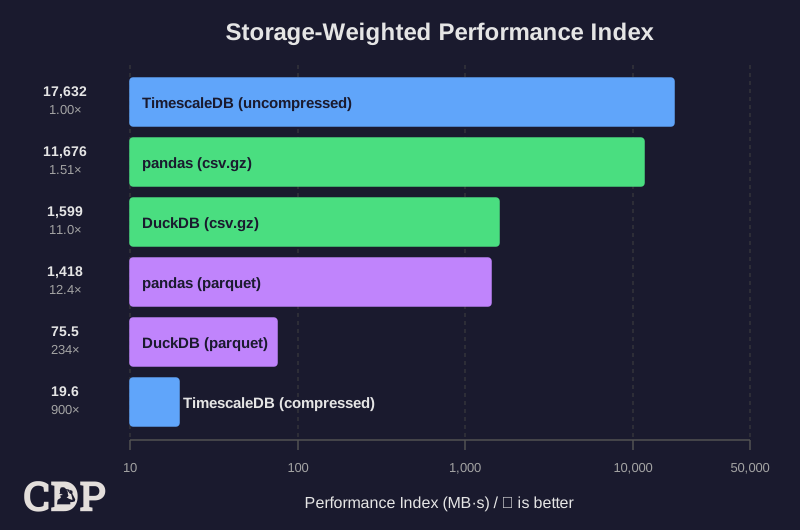
How can be we combine the various charts into a single metric? The following chart illustrates why time series databases like TimescaleDB are attractive for both storage and query performance. The metric is derived by multiplying the storage efficiency by the time based query performance. The lower the number represents the lowest storage for the quickest query time.
Whilst duckdb is competitive, it is still a factor of 4 less than TimescaleDB. If we were to add cost as another input, it’s likely to skew the metrics more towards using a database. These two parameters are not the reason to adopt such a database, but the fact that such a solution is competitive in these areas and offers all the advantages of a database.
Introduction
The query and storage of time series data is often focused on data lakes, and now delta lakes, where fundamentally the data is stored in flat files such as the modern Parquet [1] format with comparisons made with legacy artifacts in text-based Comma Separated Values (CSV) files. Unfortunately, the narrative around the evolution of Data Platforms has become so intertwined with the road to a Lakehouse that the benefits of a database are often overlooked. The story has become so popular that it can lead many Information Technology (IT) or Information Services (IS) departments to believe that it’s the only way.

The story of the lakehouse is told so often that it could be etched in our history as depicted in the western Medieval inspired tapestry above.
Another approach is the use of time series databases such as InfluxDB [2], Prometheus [3] and PostgreSQL [4] based TimescaleDB [5] from TigerData [6]. Whereas comparisons between flat file formats and comparisons between databases are common, comparison between the two approaches are not.
To enable the comparison, we use Formula 1 race car telemetry data from the 2024 Season recorded at high frequencies but unfortunately only available publicly at 3.7Hz, totalling 9.4 Million records across 24 Grand Prix events from 25 drivers. This is not intended as a benchmark between technologies but a practical examination of how time series data could be stored and queried.
In this analysis we compare primarily the storage efficiency between parquet files and TimescaleDB whilst examining the impact on query performance. An additional comparison to CSV files compressed with gzip are also presented to reflect legacy thinking on the storage of Internet-of-Things (IoT) data. To contextualise the queries, we also compare the performance of the database with a leading query engine, DuckDB [7] as well as the widely used pandas Python library.
Results
Storage Efficiency
As expected, uncompressed text file based formats consume more storage than the modern columnar format such as parquet. Compression using mature algorithms such as gzip can reduce the storage consumed, but doesn’t provide the structural advantage from the organisation of data within a parquet file for analytical usage.
The data for these tests is the Formula 1 race car telemetry data from all 25 rounds of the 2024 season. In native Comma Separated Value (CSV) format, where one file represents each race, the storage consumed is 2.3 GiB. Using the gzip compression algorithm leads to around an 8 fold reduction. A modern format like parquet can support a number of compression algorithms; using default settings leads to a similar reduction of around a factor of 11. What this metric doesn’t capture is that the parquet file stores data in a columnar orientation making it easier to run analytical queries and selective parameter loading; this is illustrated in the next chart.
The same data in a TimescaleDB hypertable, consumes around 2.6 GiB, slightly larger than the CSV files; however TimescaleDB (in the Community and Enterprise) edition enables compression. The consequence of enabling compression can be increased query time (depending on the query itself) but significant reductions in storage space, in this example as low as 1.3 MiB (or 0.001 GiB).
| Format | Time | Relative | Storage |
|---|---|---|---|
| DuckDB (parquet) | 0.38s | 1.00x | 198.6 MB |
| DuckDB (csv.gz) | 5.77s | 15.26x | 277.2 MB |
| TimescaleDB (uncompressed) | 6.54s | 17.28x | 2696 MB |
| TimescaleDB (compressed) | 14.67s | 38.79x | 1.334 MB |
| pandas (parquet) | 7.14s | 18.87x | 198.6 MB |
| pandas (csv.gz) | 42.12s | 111.34x | 277.2 MB |
The storage results for TimescaleDB can be difficult to believe, so an alternative approach was used to verify the results using the following SQL query:
Some of the columns have been removed for brevity, but the key columns are shown below:
| table_name | row_count | uncompressed_size | compressed_size |
|---|---|---|---|
| c_telemetry_2024 | 9,389,723 | 0 bytes | 1344 kB |
| telemetry_2024 | 9,389,723 | 2696 MB | 0 bytes |
The full query confirms that all 24 chunks in the compressed table (c_telemetry_2024) are fully compressed, while the uncompressed table (telemetry_2024) has no compressed chunks (as expected). Both tables contain the same 9.4 million records.
-- Detailed size breakdown for all telemetry hypertables
WITH chunks AS (
    SELECT
        c.hypertable_name::text AS table_name,
        c.chunk_name,
        c.is_compressed,
        pg_total_relation_size('_timescaledb_internal.' || c.chunk_name) AS chunk_total_size,
        pg_relation_size('_timescaledb_internal.' || c.chunk_name) AS chunk_heap_size,
        pg_indexes_size('_timescaledb_internal.' || c.chunk_name) AS chunk_index_size
    FROM timescaledb_information.chunks c
    WHERE c.hypertable_name LIKE '%telemetry%'
),
row_counts AS (
    SELECT
        'telemetry_2024' AS table_name,
        COUNT(*) AS row_count
    FROM telemetry_2024
    UNION ALL
    SELECT
        'c_telemetry_2024' AS table_name,
        COUNT(*) AS row_count
    FROM c_telemetry_2024
),
summary AS (
    SELECT
        c.table_name,
        COUNT(*) AS total_chunks,
        SUM(CASE WHEN is_compressed THEN 1 ELSE 0 END) AS compressed_chunks,
        SUM(chunk_total_size) AS heap_total_bytes,
        SUM(CASE WHEN is_compressed THEN chunk_total_size ELSE 0 END) AS compressed_bytes,
        SUM(CASE WHEN NOT is_compressed THEN chunk_total_size ELSE 0 END) AS uncompressed_bytes
    FROM chunks c
    GROUP BY c.table_name
)
SELECT
    s.table_name,
    r.row_count,
    s.total_chunks,
    s.compressed_chunks,
    pg_size_pretty(s.uncompressed_bytes) AS uncompressed_size,
    pg_size_pretty(s.compressed_bytes) AS compressed_size,
    pg_size_pretty(s.heap_total_bytes) AS total_heap_size,
    CASE
        WHEN s.heap_total_bytes > 0 AND s.compressed_chunks > 0
        THEN ROUND(100.0 * s.compressed_bytes / s.heap_total_bytes, 2)
        ELSE 0
    END AS compressed_percent
FROM summary s
JOIN row_counts r ON s.table_name = r.table_name
ORDER BY s.table_name;
General Queries
The query calculates the rolling average speed over a 30 second period, deliberately designed to ensure no equivalent time series function is used. An equivalent (but not exactly the same) query was also applied with duckdb and pandas.
Only a single bar is presented for TimescaleDB even though the query was run on both the compressed and uncompressed_ tables. The query time is similar for both tables, but the storage is significantly different:
| Table | Execution Time | Rows Returned | Storage Size |
|---|---|---|---|
| Uncompressed | 126.670s | 25 | 2,700 MiB |
| Compressed | 121.450s | 25 | 1.34 MiB |
The chart above shows that pandas is 2-6x quicker than PostgreSQL and duckdb is 13-30x quicker. The case for running these type of column orientated queries with groupby or partitions is made well with this test. The easy access to the data in potentially a memory transfer efficient protocol is illustrated here. It shouid be noted that this not a benchmark in that both the pandas and duckdb times include loading the data as well as running the query. It should be stressed the results were exactly the same for all the technologies.
The query identified the peak 30-second average speeds across the 2024 season:
| Round | Grand Prix | Driver | Lap | Max 30s Avg (km/h) |
|---|---|---|---|---|
| 1 | Bahrain Grand Prix | 27 (Hülkenberg) | 50 | 321.41 |
| 2 | Saudi Arabian Grand Prix | 23 (Albon) | 33 | 334.14 |
| 3 | Australian Grand Prix | 27 (Hülkenberg) | 41 | 325.25 |
| 4 | Japanese Grand Prix | 27 (Hülkenberg) | 46 | 316.27 |
| 5 | Chinese Grand Prix | 18 (Stroll) | 34 | 311.80 |
| 6 | Miami Grand Prix | 18 (Stroll) | 48 | 314.14 |
| 7 | Emilia Romagna Grand Prix | 20 (Magnussen) | 51 | 333.37 |
| 8 | Monaco Grand Prix | 44 (Hamilton) | 78 | 286.00 |
| 9 | Canadian Grand Prix | 3 (Ricciardo) | 64 | 305.67 |
| 10 | Spanish Grand Prix | 24 (Zhou) | 44 | 325.05 |
| 11 | Austrian Grand Prix | 16 (Leclerc) | 54 | 309.60 |
| 12 | British Grand Prix | 23 (Albon) | 44 | 293.24 |
| 13 | Hungarian Grand Prix | 10 (Gasly) | 4 | 304.56 |
| 14 | Belgian Grand Prix | 18 (Stroll) | 16 | 291.14 |
| 15 | Dutch Grand Prix | 20 (Magnussen) | 3 | 338.88 |
| 16 | Italian Grand Prix | 27 (Hülkenberg) | 3 | 349.54 |
| 17 | Azerbaijan Grand Prix | 44 (Hamilton) | 39 | 356.33 |
| 18 | Singapore Grand Prix | 43 (Colapinto) | 31 | 291.46 |
| 19 | United States Grand Prix | 4 (Norris) | 49 | 285.46 |
| 20 | Mexico City Grand Prix | 44 (Hamilton) | 34 | 328.66 |
| 21 | São Paulo Grand Prix | 55 (Sainz) | 12 | 321.00 |
| 22 | Las Vegas Grand Prix | 16 (Leclerc) | 13 | 338.29 |
| 23 | Qatar Grand Prix | 44 (Hamilton) | 45 | 320.47 |
| 24 | Abu Dhabi Grand Prix | 20 (Magnussen) | 57 | 272.38 |
WITH rolling_averages AS (
    SELECT
        round_number,
        event_name,
        driver_number,
        driver,
        lap_number,
        timestamp,
        speed,
        -- Calculate 30-second rolling average speed
        AVG(speed) OVER (
            PARTITION BY round_number, driver_number, lap_number
            ORDER BY timestamp
            RANGE BETWEEN INTERVAL '30 seconds' PRECEDING AND CURRENT ROW
        ) AS speed_30s_avg
    FROM c_telemetry_2024
    WHERE speed IS NOT NULL
),
max_speeds AS (
    SELECT DISTINCT
        round_number,
        event_name,
        MAX(speed_30s_avg) OVER (PARTITION BY round_number, event_name) AS max_avg_speed
    FROM rolling_averages
)
SELECT
    r.round_number,
    r.event_name,
    r.driver_number,
    r.driver,
    r.lap_number,
    ROUND(m.max_avg_speed::numeric, 2) AS max_30s_avg_speed,
    r.timestamp AS period_end
FROM rolling_averages r
JOIN max_speeds m
    ON r.round_number = m.round_number
    AND r.event_name = m.event_name
    AND r.speed_30s_avg = m.max_avg_speed
ORDER BY r.round_number;The analysis conducted was not a benchmark between flat files and a database for storage efficiency and query performance.
For example, the time taken to load data into the database is not included in the performance comparison because the intent is to have the data ready for querying. In contrast for both duckdb and pandas it includes loading and querying the data. This is not therefore an accurate comparison of query performance but a pragmatic comparison of how the tools are used in real-life. Analytical queries using both tools mean loading the data to analyse - so inherent in that way of working.
Typically, we favour reproducible analysis but given the nature of this post and the context was around a private client, the code and data cannot be shared. However, the key principles have been outlined and are relatively easy to reproduce with the help with Artificial Intelligence (AI) tools.
Time-based Queries
There is a significant shift in TimescaleDB’s performance from being non-competitive in the previous query and now in some instances faster than pandas. This is because the query is designed to leverage the time-based indexing and partitioning capabilities of TimescaleDB through what’s referred to as hyperfunctions [8]. These are many common time series functions that are optimised for performance. The key difference between the two queries is the use of the time_bucket function to group the data by 30-second fixed intervals instead of a rolling window. So it’s not an equivalent query but a different one providing a different insight.
As its simpler, all the technologies are able to run the query quicker than the rolling window example, but one that TimescaleDB is optimised for.
Overall Effectiveness
There is no one single metric that can adequately describe the effectiveness of these technologies in consuming the data as we haven’t outlined what the data is, the type of queries etc. Nonetheless, the four charts including the one above provide an insight as to why TimescaleDB and other time series databases may be attractive for some use cases.
The chart above shows a crude compound metric that is the product of the storage efficiency and the time series function based query performance, where a lower index value means “better”. We see in the data that duckdb is an order of magnitude better than pandas using the same file formats. This is likely to diminish with newer versions of pandas. The standout result for this compound metric is TimescaleDB with the compressed data; a factor of 4-5 lower than duckdb with parquet flat files.
This isn’t a benchmark between these technologies but illustrates why time series databases are selected for these uses cases and what the characteristics of the data and uses cases should include to see these type of benefits using the axes of storage efficiency and time series based query performance.
Setup
This is a brief overview of the key libraries and components used to perform the analysis. The F1 telemetry data pipeline utilised fundamentally the fastf1 package, whereas the database used podman to run an OCI container from TigerData directly.
Key Software Components
The telemetry data was collected using Python with the following key packages:
| Package | Version | Purpose |
|---|---|---|
fastf1 |
≥3.3.0 | Official Formula 1 data API for accessing live and historical telemetry |
pyarrow |
≥15.0.0 | Efficient Parquet file I/O |
psycopg2-binary |
≥2.9.0 | PostgreSQL database adapter |
duckdb |
≥1.4.3 | High-performance analytical database |
pandas |
≥2.2.3 | Data manipulation and analysis |
timescale/timescaledb |
2.24.0-pg17 | Time series database |
Database Compression Policy
The database was stored in a hypertable, with the chunk_time_interval set so that data was chunked by race; changing to the order of minutes or changing the partitions below could potentially optimise some of the queries further.
SELECT create_hypertable('telemetry_2024', 'timestamp',
                      chunk_time_interval => INTERVAL '1 day');
A number of indexes were also created:
(driver_number, timestamp)(event_name, timestamp)(round_number, timestamp)(session, timestamp)
To enable compression, a copy of the telemetry table was created and compression was configured:
-- Compression configuration
ALTER TABLE c_telemetry_2024 SET (
    timescaledb.compress,
    timescaledb.compress_segmentby = 'driver_number',
    timescaledb.compress_orderby = 'timestamp'
);

-- Compression policy
SELECT add_compression_policy('c_telemetry_2024', INTERVAL '7 days');
The compression strategy segments data by driver_number, grouping each driver’s telemetry as a continuous time series. Data is ordered by timestamp to ensure temporal locality within compressed segments, and a 7-day retention policy automatically compresses older data. In this instance, compressing all of the data.
Conclusion
The dominance of the lakehouse narrative in modern data platform discussions can obscure that databases remain a compelling choice for many analytical workloads, particularly those involving time series data. This analysis of Formula 1 race car telemetry data illustrates the conditions under which a time series database like TimescaleDB can be more beneficial than the conventional flat file approach.
The results are not uniformly in favour of any single technology. For general analytical queries, duckdb with parquet files delivers exceptional performance faster than TimescaleDB for rolling window calculations. This validates the rationale behind the lakehouse approach for Exploratory Analysis and Machine Learning pipelines where query patterns are unpredictable.
However, when queries use optimised time based functions (covering many use cases), referred to in TimescaleDB as hyperfunctions, - the performance gap narrows considerably. Coupled with TimescaleDB’s remarkable compression capabilities (reducing 2.7 GiB to 1.3 MiB), the (crude but pragmatic) compound effectiveness metric favours the database approach by a factor of four or more. These storage efficiencies can translate directly to reduced infrastructure costs but for Data Practitioners this translates to these advantages in addition to all the benefits of a database.
This analysis has demonstrated that the medieval tapestry of data platform evolution deserves an additional panel, one depicting the unreasonable effectiveness of a database, in particular the PostgreSQL ecosystem.
Version History
2026-04-10- Revised punctuation for clarity and fixed minor typo.2026-01-20- Original
Attribution
Images used in this post have been generated using multiple Machine Learning (or Artificial Intelligence) models and subsequently modified by the author.
Where ever possible these have been identified with the following symbol:

The text has been reviewed using Large Language Models for spelling, grammar, and word choice; however, the content, analysis, and conclusions are entirely the author’s own.
References
Citation
@online{miah2026,
  author = {Miah, Ashraf},
  title = {Cracking {Compression:} {Clever} {Choices} for {Time} Series
    {Data}},
  date = {2026-01-14},
  url = {https://blog.curiodata.pro/posts/19-f1-dummy-data/},
  langid = {en}
}